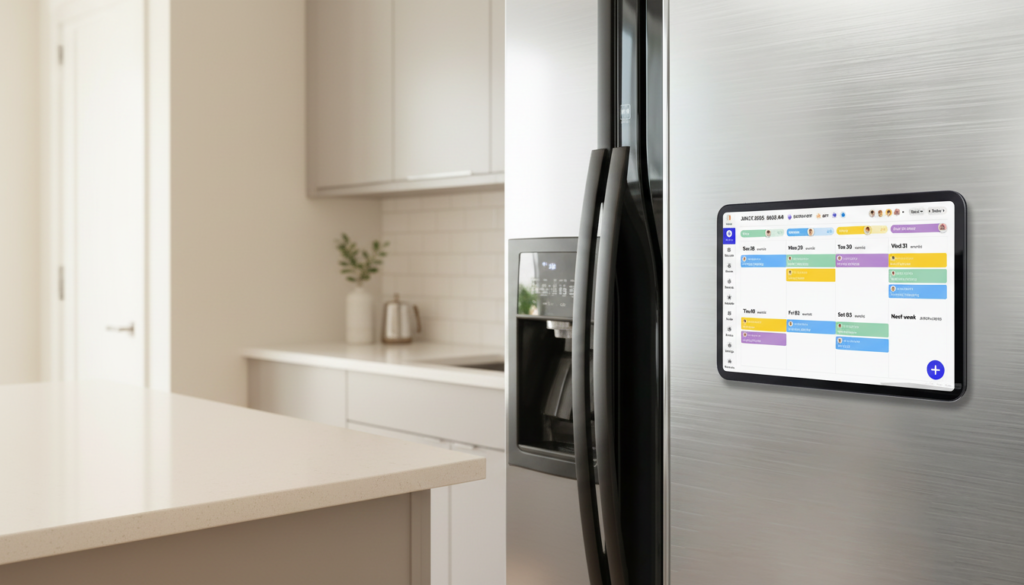
Between back-to-back meetings, shifting deadlines, and the constant ping of new requests, even the most organized professionals can feel like they’re losing the battle against their own schedules. Sticky notes pile up, phone reminders get swiped away, and desktop calendar apps get buried under open tabs. The result? Missed appointments, duplicated efforts, and a persistent sense that the day is running you rather than the other way around.
A modern touch screen calendar for wall offers something fundamentally different: a dedicated, always-visible command center that puts your entire schedule in plain sight. Unlike a paper calendar that can’t sync with your inbox, or a phone app that competes for attention with social media and notifications, a wall-mounted digital display transforms an empty wall into an active planning hub.
The difference goes beyond aesthetics. These devices bring hands-free control through AI Voice Input, letting you capture ideas and schedule events without stopping what you’re doing. They elevate task management from a simple list into a visual, interactive workflow. So how exactly can this technology solve the real pain points that drain your productive hours? The sections ahead break down the practical benefits — from effortless voice scheduling to building a daily routine that actually sticks.
Beyond Paper: The Modern Command Center
A wall-mounted digital calendar is exactly what it sounds like — a large touchscreen display, typically ranging from 10 to 27 inches, mounted at eye level in your workspace and dedicated entirely to scheduling, planning, and task visibility. Unlike a phone or laptop calendar that requires you to unlock a device, navigate an app, and compete with a dozen other open notifications, this display is always on, always visible, and always relevant.
The most immediate advantage is scale. Seeing your entire week laid out across a crisp, high-resolution screen changes how you process time. You can spot scheduling conflicts at a glance, recognize when a day is overloaded before it becomes a crisis, and visually track the flow of your week without squinting at a 4-inch phone display. That spatial awareness alone reduces the cognitive effort of staying organized.
Beyond visibility, these devices connect directly to the digital tools you already use. Sync your Google Calendar, Outlook, or Apple Calendar, and every meeting invitation accepted on your laptop instantly appears on the wall. Updates flow in real time, so the display always reflects your current reality rather than a snapshot from last Tuesday. Some models also integrate with project management platforms, email clients, and smart home systems, making the wall calendar a genuine hub rather than just another screen.
Placement reinforces its role as a physical planning center. Mounted in a home office, near your desk, or in a shared workspace, it anchors your day in a way that a buried browser tab never can. You walk in, you see the plan, and you start moving with intention rather than scrambling to reconstruct what needs to happen next.
Leveraging AI Voice Input for Effortless Scheduling
The single biggest friction point in maintaining any calendar system is the moment between having a thought and recording it. You’re on a call, someone proposes a follow-up meeting, and by the time you’ve unmuted, found your phone, and opened the app, either the conversation has moved on or you’ve already half-forgotten the details. AI Voice Input eliminates that gap entirely, letting you speak directly to your wall calendar the same way you’d tell an assistant to handle it.
Activation is straightforward. Most systems respond to a wake word or a tap on the display’s microphone icon. From there, natural language commands do the work. You don’t need to memorize syntax — the AI interprets intent. Say “Add team standup every Monday at 9 AM” and the recurring event populates automatically. Say “Schedule a client review Friday at 3 PM and remind me an hour before” and both the event and the reminder are set in a single breath. Need to know what’s ahead? “What do I have tomorrow afternoon?” pulls up your schedule without you touching a single button.
The real productivity gain comes during multitasking. When you’re mid-task and an idea or obligation surfaces, capturing it hands-free means zero interruption to your current focus. The thought goes onto the calendar immediately, not into a mental holding queue where it quietly waits to be forgotten. Reminders set by voice are also more likely to be specific and actionable because you’re creating them in context, not retroactively reconstructing details later.
Practical Steps for Voice Command Mastery
Getting consistent results from voice input comes down to a few habits. Speak in complete, specific commands: include the event name, date, time, and any recurrence in one phrase. Position the display at roughly arm’s reach so the microphone picks up your natural speaking voice without you needing to raise it. If your system supports a voice training or personalization mode, run through it once during setup — this calibrates recognition to your accent and cadence, meaningfully reducing misinterpretations and making hands-free scheduling reliable from day one.
Streamlining Task Management with a Digital Calendar Hub
Most calendar tools stop at scheduling — they tell you when something happens but do little to help you manage the work itself. A task management-capable wall calendar bridges that gap, turning a scheduling display into an active workflow tool where appointments and actionable tasks coexist in the same visual space.
Color-coding is one of the most immediately useful features. Assign a distinct color to each project, client, or life category — deep blue for client deliverables, green for internal meetings, orange for personal commitments — and your week becomes a visual map rather than a wall of identical text entries. At a glance, you can see whether Tuesday is dominated by one project that’s crowding out everything else, or whether your deep-focus work blocks are getting consistently fragmented by meetings. That pattern recognition is nearly impossible when tasks and events live in separate apps or on a paper list.
Beyond color, the touchscreen interface lets you manipulate your schedule physically. Drag a task from Wednesday to Thursday when a deadline shifts. Flag high-priority items so they visually rise above routine entries. Connect your preferred to-do list app — whether that’s Todoist, Microsoft To Do, or Apple Reminders — and those tasks populate directly onto the calendar surface, anchored to the time blocks where you plan to complete them rather than floating in a separate list you’ll check only when you remember to open it.
The cumulative effect is a meaningful reduction in cognitive load. When everything you need to do and every commitment you’ve made occupies the same visible canvas, your brain stops spending energy trying to hold it all in working memory. You can focus on the task in front of you because the wall behind you is already holding the rest of the plan.
Integrating Your Touch Screen Calendar into a Productive Workflow
The hardware is only half the equation. The real transformation happens when the calendar becomes a fixed part of how your day actually runs — not a tool you remember to check occasionally, but a rhythm you build around.
Start with placement. Mount the display at eye level in the room where you do your primary work — your home office wall, beside your desk, or at the entrance to a shared workspace. The goal is unavoidable visibility: you should see it the moment you sit down and glance at it naturally throughout the day. Avoid tucking it behind a monitor or in a corner where it becomes peripheral furniture rather than an active planning surface.
Initial setup takes roughly thirty minutes done properly. Connect your existing Google Calendar, Outlook, or Apple Calendar accounts so historical events and upcoming commitments import immediately. Then link any project management or to-do apps you use daily. This single setup session eliminates the friction of manual data entry going forward — your existing digital life flows onto the wall automatically. Devices like Everblog are designed with this streamlined onboarding in mind, making the transition from scattered tools to a unified wall display as frictionless as possible.
From there, build three daily touchpoints into your routine. In the morning, spend two to three minutes reviewing the full day on the display before opening your inbox — this sets your priorities before email has a chance to reset them. Throughout the day, use voice input to capture new tasks, reschedule items, and set reminders the moment they arise rather than banking them mentally. At day’s end, do a quick scan to flag anything unfinished and drag it to a realistic slot in the coming days.
Reserve fifteen minutes each Sunday or Monday morning for a weekly strategy session. Use the large canvas to look across the full week, identify overloaded days, and redistribute tasks before the pressure of deadlines forces reactive decisions. This single habit converts the calendar from a passive record into a genuine planning instrument.
Key Considerations When Choosing Your Wall Calendar
Selecting the right device comes down to matching specifications to how you actually work. Screen size is the starting point — a 10-inch display suits a personal desk setup, while a 21-inch or larger screen works better in shared spaces where multiple people need to read it at a distance. Pair size with resolution: a sharp, high-contrast display reduces eye strain during long workdays and makes color-coded categories genuinely distinguishable rather than muddy. Touch responsiveness matters more than most buyers anticipate — a display that lags or requires repeated taps quickly becomes frustrating enough to abandon. Test or research latency before committing. The quality of the AI Voice Input system deserves equal scrutiny; look for natural language processing that handles conversational commands, not just rigid syntax. Compatibility is non-negotiable — confirm the device syncs natively with Google Calendar, Outlook, or Apple Calendar before purchasing, and check whether your preferred to-do or project management apps are supported. Brands operating specifically in the digital calendar space, such as Everblog, tend to prioritize these integrations more deeply than general-purpose smart display manufacturers. Finally, evaluate mounting options relative to your wall type and workspace layout, ensuring the hardware can be positioned at true eye level for effortless daily visibility.
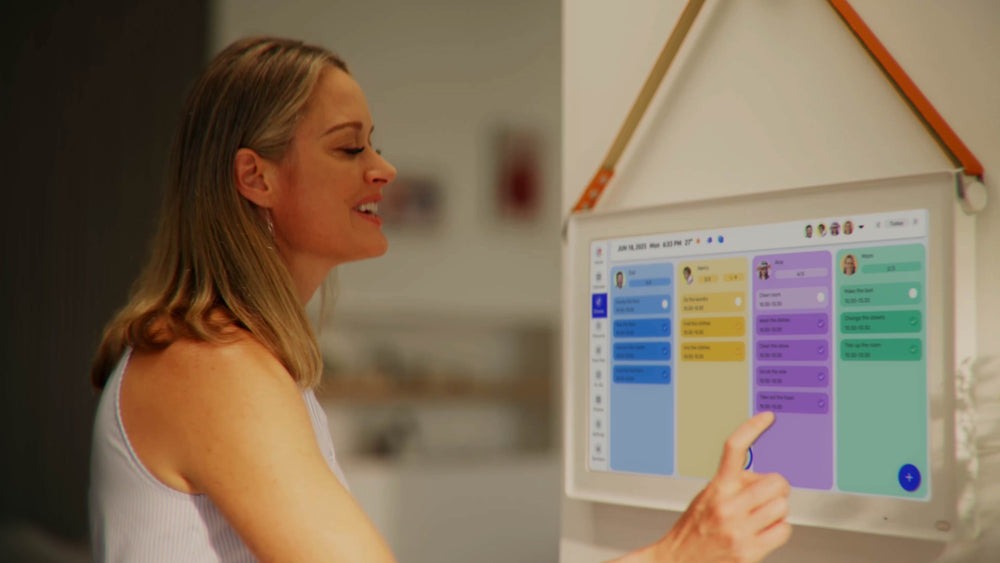
From Scattered Tools to a Unified Planning System
The workday doesn’t have to feel like a constant scramble to keep up. A touch screen wall calendar shifts the dynamic fundamentally — from a passive record of appointments to an interactive, voice-activated command center that works with you in real time. What begins as a scheduling display quickly becomes the organizational backbone of your entire professional routine.
For busy professionals, the compounding benefits are hard to overstate. Visual clarity across a large, always-on screen means scheduling conflicts and overloaded days surface before they become problems. Hands-free control through AI Voice Input means every obligation gets captured the moment it arises, not hours later when the details have blurred. And centralized task management — with color-coding, drag-and-drop rescheduling, and app integrations — means your to-do list and your calendar finally occupy the same space, eliminating the mental effort of reconciling them separately.
The technology itself is only the starting point. The real return comes from building consistent habits around it: the morning review that sets your priorities before email hijacks them, the voice commands that capture tasks mid-flow, the weekly planning session that keeps the bigger picture in focus. Adopt those rhythms, and the wall calendar stops being a gadget and becomes the system that lets you reclaim genuine control over your time — and the mental space to use it well.