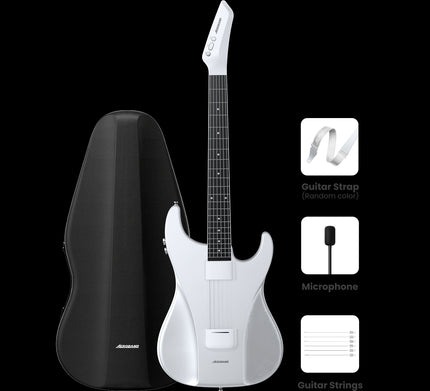
For guitarists seeking to expand their creative horizons, the challenge of connecting instruments to digital platforms has long been a frustrating barrier. Traditional cable setups limit mobility, while incompatible systems force musicians to choose between practicing with their favorite apps or maintaining a streamlined workflow. The modern guitarist needs more than just an amplifier—they need seamless integration with recording software, practice tools, and performance applications without being tethered to a desk or tangled in wires.
This connectivity gap becomes especially apparent when trying to incorporate MIDI functionality into guitar playing. While keyboard players have enjoyed straightforward MIDI integration for decades, guitarists have struggled with clunky converters, latency issues, and complicated setups that interrupt the creative flow. The result is missed opportunities for composition, limited sound experimentation, and a disconnect between the guitarist’s vision and their ability to bring it to life through modern technology. What’s needed is a solution that bridges the analog world of guitar playing with the digital realm of contemporary music production, offering both simplicity and powerful functionality in one package.
Introduction to MIDI Software
MIDI, which stands for Musical Instrument Digital Interface, is a technical standard that allows electronic instruments, computers, and software to communicate with each other. Unlike audio signals that capture actual sound waves, MIDI transmits data about musical performance—which notes are played, how hard they’re struck, how long they’re held, and various other performance parameters. This distinction makes MIDI incredibly powerful for music creation, as it allows musicians to record their performances as editable data rather than fixed audio.

For guitarists, MIDI software opens up transformative possibilities that extend far beyond traditional amplification. Through MIDI, a guitar can trigger synthesizers, orchestral samples, drum machines, and virtually any sound imaginable. It enables guitarists to compose multi-instrumental arrangements without needing to master keyboard techniques, layer complex soundscapes in real-time performances, and edit their musical ideas with precision that would be impossible with standard audio recordings. The technology also facilitates practice and learning by allowing integration with interactive apps that provide instant feedback, backing tracks that respond to your playing, and notation software that transcribes performances automatically. What once required expensive hardware converters and technical expertise has evolved into accessible software solutions that bring professional-grade MIDI functionality directly to guitarists, democratizing music production and expanding creative possibilities in ways that were unimaginable just a few years ago.
Key Features of Midifish
Bluetooth Guitar Connectivity
Midifish eliminates the cable clutter that has constrained guitarists for generations by implementing robust Bluetooth connectivity that maintains professional-grade signal quality. The wireless connection operates with minimal latency, typically under 10 milliseconds, which means your playing feels as immediate and responsive as a traditional cable setup. This freedom transforms how you interact with your instrument—you can move naturally around your practice space, perform without worrying about tripping over cables, or record from comfortable positions that would be impossible with wired connections. The Bluetooth range extends up to 30 feet in typical environments, giving you genuine mobility whether you’re tracking ideas in your home studio or rehearsing with your band. The connection process is straightforward: once initially paired, your guitar and device reconnect automatically whenever both are powered on, eliminating the frustrating setup time that plagued earlier wireless systems. This reliability means you spend more time playing and less time troubleshooting, making wireless connectivity finally practical for serious musical work.
Guitar App Integration
The Midifish ecosystem extends beyond simple connectivity to offer deep integration with popular guitar applications across iOS, Android, and desktop platforms. Whether you’re working with GarageBand, AmpliTube, BIAS FX, or any major digital audio workstation, Midifish communicates seamlessly with these applications, appearing as a recognized MIDI input device that requires no additional drivers or configuration. This compatibility opens access to thousands of amp simulations, effect pedals, and processing tools that would cost tens of thousands of dollars in physical hardware. The software intelligently manages multiple app connections, allowing you to route your guitar signal to a tuner app while simultaneously sending MIDI data to a notation program that transcribes your playing in real-time. For practice sessions, integration with apps like Yousician and Fender Play means you receive instant feedback on timing and pitch accuracy, accelerating your learning curve significantly. The app also includes its own companion interface where you can adjust sensitivity settings, calibrate string tracking, and create custom MIDI mappings that match your specific playing style and creative needs.
MIDI Software Capabilities
At its core, Midifish functions as a sophisticated pitch-to-MIDI converter that analyzes your guitar’s audio signal and translates it into precise MIDI data with impressive accuracy. The software tracks each string independently, recognizing polyphonic playing and converting complex chord voicings into individual MIDI notes that can control multiple sound sources simultaneously. This means you can play a chord on your guitar and trigger a string section, piano, and synthesizer pad all at once, creating layered arrangements that would typically require multiple instrumentalists. The MIDI implementation supports velocity sensitivity, translating your picking dynamics into expressive volume changes in whatever virtual instrument you’re controlling. Beyond note data, Midifish captures pitch bends, vibrato, and slides, transmitting these nuances as MIDI continuous controller messages that add human feel to synthesized sounds. You can assign different MIDI channels to different strings, enabling creative routing possibilities like sending your low E string to a bass synthesizer while your higher strings trigger lead sounds. The software also includes MIDI learn functionality, allowing you to map guitar techniques like palm muting or pick harmonics to control parameters in your plugins, essentially turning your guitar into a versatile MIDI controller that rivals dedicated hardware units costing significantly more.
Practical Applications of Midifish
Live Performances
Taking Midifish on stage transforms your live performance capabilities by enabling you to access a vast sonic palette without hauling heavy amplifiers and pedalboards. The wireless connection means you can move freely across the stage while triggering orchestral swells, synth bass lines, or atmospheric pads that would normally require additional band members or backing tracks. Many guitarists use Midifish to layer sounds in real-time—playing rhythm guitar through a traditional amp while simultaneously triggering string arrangements or keyboard parts through a laptop running Ableton Live or MainStage. The low latency ensures your MIDI-triggered sounds stay perfectly synchronized with your direct guitar tone, maintaining the tight timing essential for professional performances. You can create dramatic transitions by switching MIDI patches mid-song, instantly changing from a piano sound to a brass section without interrupting your playing. The system’s reliability proves crucial during shows where technical failures aren’t an option; the stable Bluetooth connection and straightforward interface mean fewer variables that could go wrong. For solo performers especially, Midifish becomes a force multiplier, allowing one guitarist to create the sonic fullness of an entire ensemble while maintaining the authentic feel of live instrumental performance.
Studio Recordings
In the recording environment, Midifish accelerates the composition and production process by allowing guitarists to quickly sketch musical ideas across multiple instruments without leaving their comfort zone. When inspiration strikes, you can immediately record a guitar part and simultaneously capture the MIDI data, which means you can later swap out sounds—turning that initial guitar melody into a flute line, cello passage, or synthesizer lead without re-recording the performance. This flexibility proves invaluable during production when you discover that a section needs a different instrumental color but the original performance had the perfect feel and timing. The polyphonic tracking enables you to strum chord progressions that trigger realistic piano or organ sounds, building full arrangements while thinking in guitar voicings rather than adapting to keyboard fingerings. Many producers use Midifish for creating realistic string and horn arrangements, playing the parts on guitar where the physical feedback and string resistance provide more natural phrasing than programming with a mouse or playing unfamiliar keyboard layouts. The MIDI data integrates seamlessly with your DAW’s editing tools, allowing you to quantize timing, adjust velocities, transpose entire sections, or extract individual notes from chords for orchestration purposes. This workflow bridges the gap between the guitarist’s intuitive playing approach and the detailed control that modern production demands, making sophisticated arrangements accessible without years of keyboard training.
How to Get Started with Midifish
Downloading and Installation
Getting Midifish up and running begins with downloading the appropriate version for your device from the App Store for iOS users or Google Play for Android devices, while desktop users can access the software through the official Midifish website. The download size is relatively modest, typically under 100MB, meaning you won’t need to clear significant storage space. Once downloaded, the installation process follows standard procedures for your operating system—simply tap or click to install, accept the necessary permissions for Bluetooth and audio access, and the software handles the rest automatically. The app requires iOS 12 or later for Apple devices, Android 8.0 or higher for Android users, and macOS 10.13 or Windows 10 for desktop installations. During first launch, Midifish runs a quick system check to verify your device meets the requirements and has Bluetooth capabilities enabled. You’ll be prompted to create a free account or sign in, which enables cloud backup of your settings and allows seamless configuration syncing across multiple devices. The entire download and installation process typically takes less than five minutes, and the interface immediately presents a setup wizard that guides you through the initial configuration steps, making the technical aspects accessible even for guitarists with limited experience in music software.
Setting Up
After installation, connecting your guitar requires a compatible Bluetooth-enabled pickup or interface installed on your instrument—Midifish works with most modern wireless guitar systems and MIDI-capable pickups, including those from manufacturers like AeroBand who specialize in wireless music technology. Power on your guitar’s Bluetooth transmitter, then open the Midifish app and navigate to the connection menu where available devices appear automatically. Select your guitar from the list, and the pairing completes within seconds, with a confirmation tone indicating successful connection. The setup wizard then guides you through calibration, asking you to play each open string individually so the software can learn your guitar’s specific characteristics and optimize tracking accuracy. Next, adjust the input sensitivity slider while strumming at your typical playing dynamics—the visual meter should peak in the green zone without hitting red, ensuring clean MIDI conversion without false triggers. In the settings menu, select your preferred MIDI output destination, whether that’s the built-in sounds, an external app like GarageBand, or your computer’s DAW via Bluetooth MIDI. Configure the polyphonic mode based on your playing style: monophonic for single-note lead lines with fastest tracking, or polyphonic for chord recognition. Finally, test your setup by playing a few phrases and listening to the MIDI output, making minor adjustments to latency compensation if needed. Most users find the default settings work excellently, but the app includes preset configurations for common scenarios like live performance, studio recording, or practice sessions that optimize different parameters with a single tap.
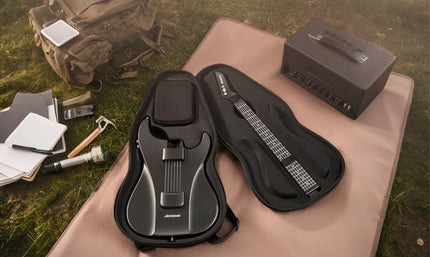
Expanding Your Musical Possibilities with Midifish
Midifish represents a genuine breakthrough for guitarists who have long watched keyboard players enjoy seamless MIDI integration while struggling with cumbersome workarounds. By combining wireless Bluetooth connectivity, comprehensive app compatibility, and sophisticated pitch-to-MIDI conversion in a single accessible package, it removes the technical barriers that have kept many guitarists from exploring the creative possibilities of digital music production. The freedom to move untethered during performances, the ability to compose full arrangements while thinking in guitar voicings, and the seamless integration with both mobile and desktop platforms make Midifish more than just another music app—it’s a practical tool that expands what’s possible with your instrument.
Whether you’re a bedroom producer looking to create layered compositions without learning keyboard, a live performer seeking to add orchestral depth to your sound, or simply a guitarist wanting to practice with interactive apps that accelerate your progress, Midifish delivers professional capabilities without the professional complexity. The straightforward setup process, reliable performance, and intuitive interface mean you can focus on making music rather than troubleshooting technology. For guitarists ready to bridge the gap between traditional playing and modern production possibilities, Midifish offers an accessible entry point into the world of MIDI that finally respects the guitarist’s workflow and creative instincts.